Week 12 — 酬載與資料
week12_payload_data/基礎知識導論
Week 12 基礎知識導論 — 酬載、資料預算與記錄器管理
一顆地球觀測衛星的價值,等於它送回地面的資料量乘以資料的品質。
拍得到但送不下來,等於沒拍。這一週把 access 統計變成一條可以看的曲線。
1. 這一週在解什麼問題
FIREYE 一天能拍幾次?產生多少資料?能下傳多少?
記錄器要多大才不會溢出?成像速率的上限在哪裡?
本週直接讀 Week 4 產生的真實 STK 報告(imaging_access.txt / downlink_access.txt),
不是用假設值。
2. 核心觀念
2.1 資料從哪裡來:酬載端
每張影像位元數 = 像素數 x 每像素位元數 x 波段數 / 壓縮比
例:2048 x 2048、12 bit、3 波段、無損壓縮 2:1
2048 * 2048 * 12 * 3 / 2 = 75.5 Mbit ≈ 9.4 MB
推播式(push-broom)感測器則用「掃描線速率 x 位元數」表示,
資料率是連續的 —— 這時候「成像時間」直接乘上資料率。
2.2 資料到哪裡去:下傳端
每次通聯可下傳 = Rb x t_pass x η_link
t_pass是扣掉仰角遮罩後的有效通聯時間(不是幾何過境時間)η_link是協定效率:框架開銷、前導、重傳、AOS/LOS 邊緣的低仰角段可能降速
典型 0.6–0.85
低仰角段的鏈路餘裕最差(Week 11 的 2.2),
所以實務上常在低仰角時降低位元率或乾脆不傳 —— 這會讓 η_link 進一步下降。
2.3 日平均只是必要條件
必要條件: 每日產生量 <= 每日可下傳量
滿足這個條件不代表系統可行,因為產生與下傳在時間上不同步:
- 成像發生在飛過火山時
- 下傳發生在飛過地面站時
- 兩者可能相隔數小時
所以還要看充分條件:
充分條件: 記錄器容量 >= max_t [ 累積產生量(t) - 累積下傳量(t) ]
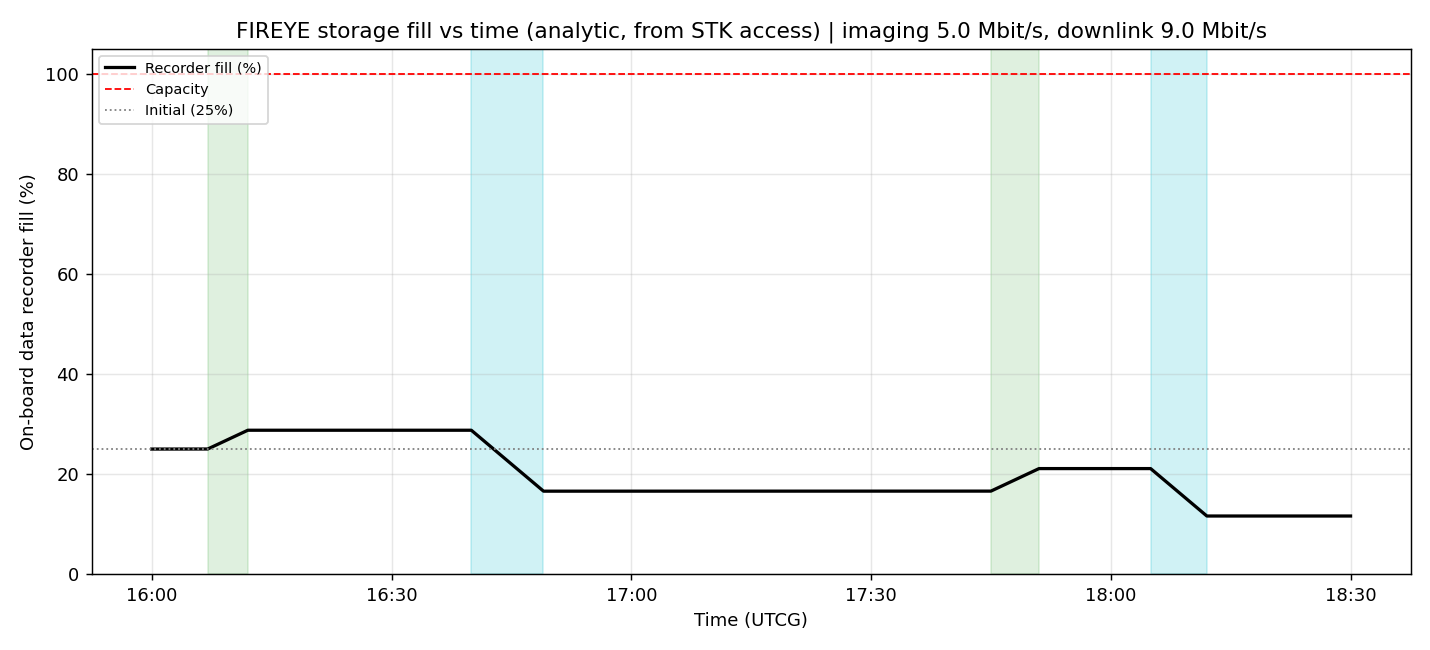
右邊就是記錄器填充曲線的峰值。這是一條積分曲線,必須畫出來看。
2.4 記錄器填充曲線
S(t) = S(0) + ∫ [ R_gen(t) * active_img(t) - R_down(t) * active_dl(t) ] dt
active_img(t)/active_dl(t)是 0/1 的開關函數,來自 STK 的 access 窗- 曲線鋸齒狀:成像窗時上升,下傳窗時下降
- 峰值出現在最長的「有成像但沒下傳」空檔之後
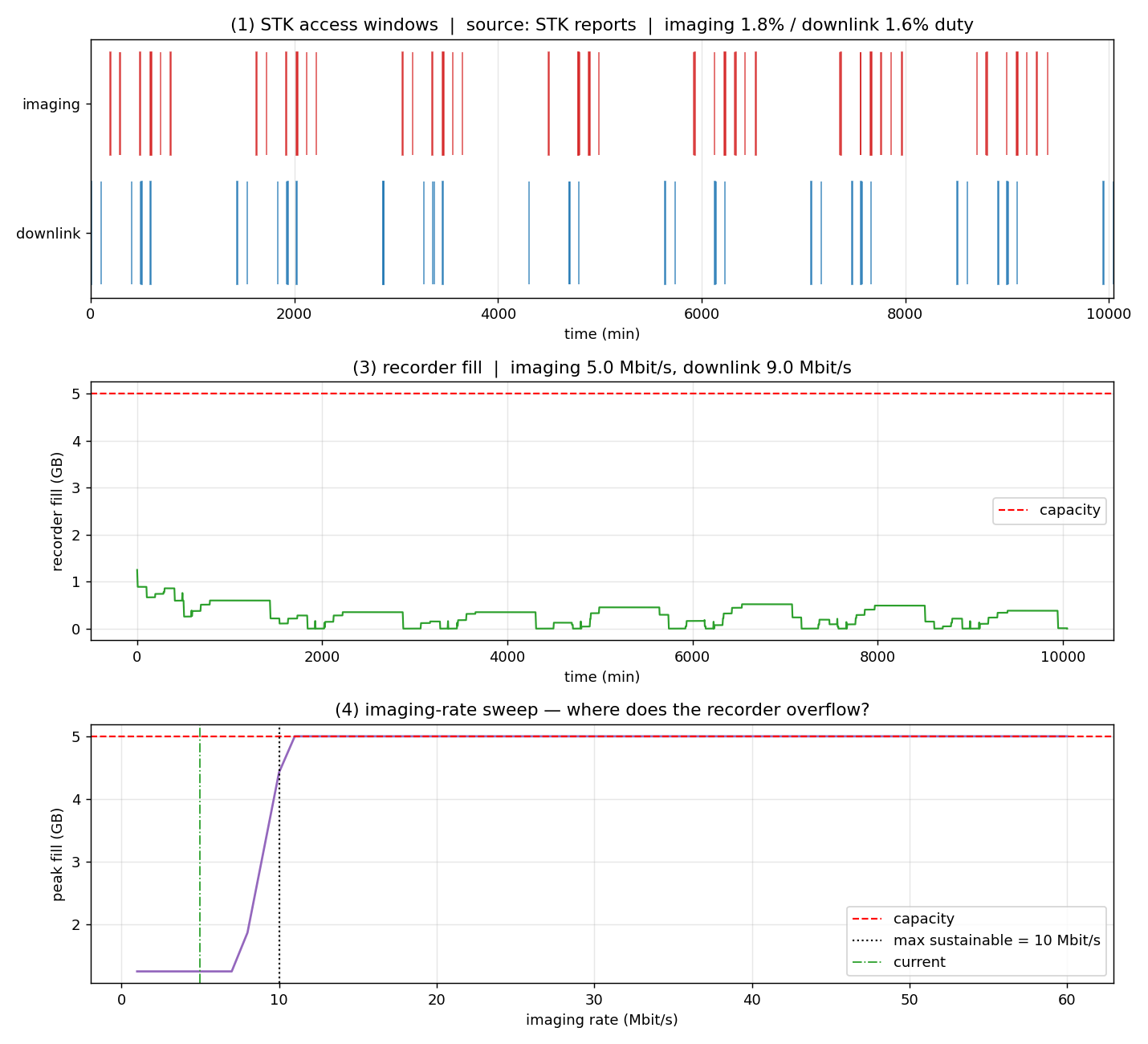
本教材的基準結果(FullScenario 獨立執行、7 天窗):
| 量 | 值 |
|---|---|
| 成像窗 | 58 個 |
| 下傳窗 | 42 個 |
| 每日產生 | 0.950 GB |
| 每日可下傳 | 1.517 GB |
| 記錄器峰值 | 1.249 GB(佔容量 25%) |
| 不溢出的成像速率上限 | 約 10 Mbit/s |
2.5 速率掃描:找上限的正確方法
不要問「10 Mbit/s 夠不夠」,要問「最大能到多少」。作法:
- 把成像速率當參數,從小掃到大
- 每個值都重算完整的填充曲線
- 找出峰值剛好碰到容量上限的那一點
這個上限告訴你:瓶頸是儲存還是下傳。
如果上限遠低於日平均允許值,瓶頸是記錄器容量或排程,不是鏈路。
2.6 分析時間窗會改變一切
本教材踩過的坑:同一份腳本,場景時間窗不同,結果完全不同。
| 場景設定 | 成像窗 / 下傳窗 |
|---|---|
| FullScenario 獨立執行(7 天) | 58 / 42 |
| 沿用 Lab1 的 14 天窗 | 112 / 79 |
這個差異很容易被歸因到 SetAttitude 的修正,實際上是時間窗長度造成的。
教材因此加了一條視窗長度斷言,把這個前提變成可執行的檢查。
教訓:報告的統計量永遠要跟著「這是多長的窗」一起報。
單獨的「58 個窗」是沒有意義的數字。
2.7 資料處理:在天上做還是在地上做
| 策略 | 優點 | 缺點 |
|---|---|---|
| 全下傳原始資料 | 地面可反覆重處理 | 資料量最大 |
| 星上壓縮 | 直接減少下傳量 | 有損壓縮不可逆 |
| 星上篩選(只傳有火山活動的) | 減少量最多 | 需要星上演算法,誤判會永久失去資料 |
| 星上處理只傳結果 | 極小資料量 | 完全依賴星上演算法的正確性 |
這是一個典型的架構決策,取決於你對星上演算法的信心與科學需求的可逆性。
CubeSat 的算力有限,但近年 AI 加速器已經讓星上篩選變得可行。
3. 名詞與符號
| 符號 | 意義 | 單位 | 本課基準 |
|---|---|---|---|
R_gen |
成像資料率 | Mbit/s | 掃描參數 |
R_down |
下傳位元率 | Mbit/s | — |
S(t) |
記錄器已用容量 | GB | 峰值 1.249 |
t_pass |
有效通聯時間 | s | 扣掉仰角遮罩 |
η_link |
鏈路效率 | — | 0.6–0.85 |
| access 窗 | 可見時間區間 | — | 成像 58 / 下傳 42(7 天) |
| Latency | 資料延遲 | hr | 需求 < 12 |
4. 觀念 → 本週實驗對照
| 觀念 | 出現在本週的哪裡 |
|---|---|
| 讀真實 STK 報告 | week12_data_budget.py,樣式 "Complete Chain Access" |
| access 統計 | 第一段輸出 |
| 每日資料預算 | 第二段輸出 |
| 記錄器填充曲線 | 第三段輸出,tools/storage_vs_time.py |
| 速率掃描找上限 | 第四段輸出 |
| 無 STK 時的退路 | sample_access.csv(由真實報告匯出),主控台會明講用了哪個來源 |
| 視窗長度斷言 | week12_verify.py |
效能註記:
active_mask()用np.searchsorted取代逐點迴圈,
執行時間從 2 分 45 秒降到 13.4 秒。時間序列的區間查詢,幾乎都可以用二分搜尋改寫。
5. 常見誤解
- 「日平均過得去就行。」 — 見 2.3。峰值才是決定記錄器容量的條件。
- 「幾何過境時間就是通聯時間。」 — 要扣仰角遮罩,還要扣鏈路建立時間與低仰角的降速段。
- 「壓縮率可以隨便設。」 — 有損壓縮直接影響科學產出。壓縮比應由酬載需求決定,
不能由下傳能力反推(Week 3 也提過)。 - 「58 個成像窗」是一個結論。 — 沒有說明時間窗長度的統計量沒有意義。
- 「記錄器滿了就覆蓋舊的。」 — 那是一個設計決定,不是預設行為。
要明確定義溢出策略(丟最舊 / 丟最新 / 停止成像),並寫進 CONOPS。
6. 延伸閱讀
資料系統與星上處理
- NASA State of the Art of Small Spacecraft Technology
— Command & Data Handling 一章,星載電腦與儲存的實際規格。 - CCSDS 標準(太空資料系統諮詢委員會)
— 封包遙測、AOS 資料鏈路、CFDP 檔案傳輸、影像壓縮 (CCSDS 122.0) 的國際標準。
真實任務的資料格式都出自這裡。 - NASA Technical Reports Server (NTRS)
— 搜尋 "onboard data processing CubeSat" 或 "data volume budget"。
地球觀測任務案例(拿真實數字對照)
- eoPortal 衛星任務資料庫
— 查 Landsat、Sentinel-2、Planet Dove 的資料率、儲存容量與下傳架構。 - ESA CubeSats
工具
- Ansys STK 線上說明 — Chain 物件與 Complete Chain Access 報表樣式。
本機:C:\Program Files\AGI\STK 12\Help\Content\chains\chain-01.htm。 - NumPy —
searchsorted、cumsum是本週的主力函式。 - pandas — 讀取與整理 access 報表。
7. 課前自我檢核
- 每日產生量 < 每日可下傳量,系統就一定可行嗎?舉一個反例。
- 記錄器填充曲線的峰值出現在什麼時候?用一句話描述它的物理意義。
- 若成像速率上限只有日平均允許值的一半,瓶頸在哪裡?怎麼改善?
- 為什麼「58 個成像窗」這個數字單獨拿出來是沒有意義的?
- 記錄器滿了要丟最舊還是最新的資料?這個決定會影響哪一份需求?
圖
week12_payload_data/storage_vs_time.png
week12_payload_data/week12_data_budget.png
程式碼
# -*- coding: utf-8 -*-
# ================================================================
# Week 12 Lab — 酬載與資料處理:從 STK access 到資料預算與速率上限
#
# 分工:STK 給「什麼時候看得到火山、什麼時候通得到地面站」(access 幾何),
#       Python 解「資料怎麼流」(記錄器填充、每日收支、成像速率上限)。
#
# 資料來源(依序嘗試,並在主控台明講用了哪一個 —— 不做靜默退回):
#   1. C:\STK_Reports\imaging_access.txt / downlink_access.txt
#      這兩份由 Week 4 的 FIREYE_Volcano_FullScenario_Connect.txt 產生:
#          Chains */Chain/Imaging  Compute
#          ReportCreate */Chain/Imaging Type Save Style "Complete Chain Access" File ...
#      (注意樣式名是 "Complete Chain Access",不是 "Complete Access")
#   2. 本資料夾的 sample_access.csv —— 從上述報告匯出的離線樣本,
#      沒有 STK 的機器也能完整跑完這個 Lab。
#
# 四個輸出對應實驗單的四項評分:
#   (1) access 統計        —— 通聯次數、總時長、duty cycle
#   (2) 每日資料預算       —— 產生量 vs 可下傳量,是否收支平衡
#   (3) 記錄器填充曲線     —— 峰值、是否溢出、何時溢出
#   (4) 成像速率掃描       —— 找出「不溢出」的最大成像速率
#
# 輸出:week12_data_budget.png + 主控台摘要
# ================================================================

import csv
import os
import sys
from datetime import datetime, timedelta

import numpy as np
import matplotlib.pyplot as plt

# notebook 的 kernel 沒有 __file__,退回目前工作目錄
# notebook 的 kernel 沒有 __file__。而且啟動 STK Engine 會改變 process 的
# 工作目錄,所以不能事後才靠 os.getcwd() —— notebook 開頭的 bootstrap cell
# 會先把週次目錄釘在 WEEK_DIR。
HERE = (os.path.dirname(os.path.abspath(__file__)) if "__file__" in globals()
        else globals().get("WEEK_DIR") or os.path.abspath(os.getcwd()))
sys.path.insert(0, os.path.join(HERE, os.pardir, "tools"))
import storage_vs_time as svt          # 共用的記錄器工具(tools/ 下唯一一份)
import stk_paths                       # 報告目錄的單一來源

# ---------------- 任務參數(改這裡做設計迭代)----------------
IMAGING_RATE_MBPS  = 5.0                  # 成像時的產生速率
DOWNLINK_RATE_MBPS = 10.0 * 0.90          # 下傳速率 × 鏈路效率
CAPACITY_MBIT      = 5.0 * 8 * 1000       # 5 GB 記錄器 -> 40,000 Mbit
INITIAL_FILL_FRAC  = 0.25                 # 初始已用比例
STEP_SEC           = 1.0                  # 積分步長

STK_REPORTS = (stk_paths.report("imaging_access.txt"),
               stk_paths.report("downlink_access.txt"))
SAMPLE_CSV  = os.path.join(HERE, "sample_access.csv")


# ---------------- 1. 讀 access 區間 ----------------
def load_intervals():
    """回傳 (imaging, downlink, source)。找不到 STK 報告就用離線樣本,
    並且**明講**用了哪一個 —— 靜默退回是本課程反覆強調的反面教材。"""
    img = svt.parse_access_report(STK_REPORTS[0])
    dwn = svt.parse_access_report(STK_REPORTS[1])
    if img and dwn:
        print(f"[來源] STK 報告  {STK_REPORTS[0]}")
        print(f"[來源] STK 報告  {STK_REPORTS[1]}")
        return img, dwn, "STK reports"

    missing = [p for p in STK_REPORTS if not os.path.exists(p)]
    print(f"[來源] 找不到 STK 報告({', '.join(missing) or '格式不符'}),"
          f"改用離線樣本 {os.path.basename(SAMPLE_CSV)}")
    print("       要產生真實報告:先跑 Week 4 的 FIREYE_Volcano_FullScenario_Connect.txt")
    img, dwn = [], []
    with open(SAMPLE_CSV, encoding="utf-8") as f:
        for row in csv.DictReader(f):
            pair = (svt.parse(row["start"]), svt.parse(row["stop"]))
            (img if row["kind"] == "imaging" else dwn).append(pair)
    return img, dwn, "sample CSV"


def window(*interval_lists):
    """由 access 區間自己決定分析窗(不要寫死場景時間)。"""
    allv = [t for lst in interval_lists for pair in lst for t in pair]
    return min(allv), max(allv)


# ---------------- 2. access 統計 ----------------
def access_stats(intervals, t0, t1, label):
    durs = np.array([(b - a).total_seconds() for a, b in intervals])
    span = (t1 - t0).total_seconds()
    duty = durs.sum() / span * 100.0
    print(f"  {label:<10} {len(durs):>3} 次 | 總時長 {durs.sum()/60:7.1f} min "
          f"| 平均 {durs.mean()/60:5.2f} min | duty cycle {duty:5.2f} %")
    return durs, duty


# ---------------- 3. 記錄器積分 ----------------
def active_mask(intervals, t0, n, step):
    """把 access 區間轉成時間網格上的布林遮罩(向量化,只算一次)。

    直覺寫法是每一步都掃一遍區間清單,但那是 O(步數 × 區間數):
    167 hr / 1 s = 60 萬步 × 100 個區間,再乘上速率掃描的 60 次積分,
    單這一項就要兩分半 —— 和 Week 8 逐點呼叫 IGRF 是同一種錯。
    改成用 searchsorted 一次算好遮罩,之後每步只是查表。
    """
    edges = np.array([[(a - t0).total_seconds(), (b - t0).total_seconds()]
                      for a, b in intervals])
    ts = np.arange(n) * step
    mask = np.zeros(n, dtype=bool)
    for a, b in edges:
        i0, i1 = np.searchsorted(ts, a), np.searchsorted(ts, b)
        mask[i0:i1] = True
    return mask


def integrate(imaging, downlink, t0, t1, fill_mbps, drain_mbps,
              capacity=CAPACITY_MBIT, initial=None, masks=None):
    """回傳 (t_min, fill_mbit, overflow_time_or_None)。
    fill 夾在 [0, capacity];碰到 capacity 就是溢出(資料被丟掉)。
    masks 可傳入預先算好的 (imaging_mask, downlink_mask) 重複使用。"""
    n = int((t1 - t0).total_seconds() / STEP_SEC) + 1
    if masks is None:
        masks = (active_mask(imaging, t0, n, STEP_SEC),
                 active_mask(downlink, t0, n, STEP_SEC))
    m_img, m_dwn = masks
    rate = np.where(m_img, fill_mbps, 0.0) - np.where(m_dwn, drain_mbps, 0.0)

    fill = capacity * INITIAL_FILL_FRAC if initial is None else initial
    out = np.empty(n)
    overflow_at = None
    for i in range(n):
        fill = min(max(fill + rate[i] * STEP_SEC, 0.0), capacity)
        if overflow_at is None and fill >= capacity - 1e-6:
            overflow_at = i * STEP_SEC / 60.0
        out[i] = fill
    return np.arange(n) * STEP_SEC / 60.0, out, overflow_at


# ---------------- 4. 成像速率掃描 ----------------
def sweep_rate(imaging, downlink, t0, t1, rates):
    """對每個成像速率算峰值填充,找出不溢出的最大速率。
    遮罩只算一次,60 次積分共用。"""
    n = int((t1 - t0).total_seconds() / STEP_SEC) + 1
    masks = (active_mask(imaging, t0, n, STEP_SEC),
             active_mask(downlink, t0, n, STEP_SEC))
    peaks = []
    for r in rates:
        _, fill, _ = integrate(imaging, downlink, t0, t1, r,
                               DOWNLINK_RATE_MBPS, masks=masks)
        peaks.append(fill.max())
    peaks = np.array(peaks)
    ok = rates[peaks < CAPACITY_MBIT - 1e-6]
    return peaks, (ok.max() if len(ok) else None)


# ---------------- 執行 ----------------
def main():
    imaging, downlink, source = load_intervals()
    t0, t1 = window(imaging, downlink)
    span_hr = (t1 - t0).total_seconds() / 3600.0
    print(f"\n分析窗:{t0:%d %b %Y %H:%M:%S} → {t1:%d %b %Y %H:%M:%S}  ({span_hr:.2f} hr)")

    # (1) access 統計
    print("\n=== (1) access 統計 ===")
    img_d, img_duty = access_stats(imaging, t0, t1, "成像")
    dwn_d, dwn_duty = access_stats(downlink, t0, t1, "下傳")

    # (2) 每日資料預算
    print("\n=== (2) 每日資料預算 ===")
    gen_per_day = IMAGING_RATE_MBPS * img_d.sum() / span_hr * 24.0
    cap_per_day = DOWNLINK_RATE_MBPS * dwn_d.sum() / span_hr * 24.0
    print(f"  產生量   {gen_per_day/8/1000:8.3f} GB/day  "
          f"({IMAGING_RATE_MBPS:.1f} Mbit/s × {img_d.sum()/60:.1f} min)")
    print(f"  可下傳量 {cap_per_day/8/1000:8.3f} GB/day  "
          f"({DOWNLINK_RATE_MBPS:.1f} Mbit/s × {dwn_d.sum()/60:.1f} min)")
    ratio = cap_per_day / gen_per_day if gen_per_day else float("inf")
    verdict = "PASS(下傳綽綽有餘)" if ratio >= 1.0 else "FAIL(產生 > 下傳,遲早溢出)"
    print(f"  下傳/產生 = {ratio:5.2f}  ->  {verdict}")

    # (3) 記錄器填充曲線
    print("\n=== (3) 記錄器填充曲線 ===")
    tm, fill, ovf = integrate(imaging, downlink, t0, t1,
                              IMAGING_RATE_MBPS, DOWNLINK_RATE_MBPS)
    print(f"  容量 {CAPACITY_MBIT/8/1000:.1f} GB | 峰值 {fill.max()/8/1000:.3f} GB "
          f"({fill.max()/CAPACITY_MBIT*100:.1f} %) | 末值 {fill[-1]/8/1000:.3f} GB")
    print(f"  溢出:{'第 %.1f min 溢出' % ovf if ovf is not None else '整段未溢出'}")

    # (4) 成像速率上限
    print("\n=== (4) 成像速率掃描 ===")
    rates = np.arange(1.0, 60.1, 1.0)
    peaks, rmax = sweep_rate(imaging, downlink, t0, t1, rates)
    if rmax is None:
        print("  掃描範圍內都會溢出 —— 需要加大記錄器或增加地面站")
    else:
        print(f"  不溢出的最大成像速率 ≈ {rmax:.0f} Mbit/s "
              f"(目前設定 {IMAGING_RATE_MBPS:.1f} Mbit/s,餘裕 {rmax/IMAGING_RATE_MBPS:.1f}×)")

    # ---------------- 出圖 ----------------
    fig, ax = plt.subplots(3, 1, figsize=(11, 10))

    ax[0].step([d.total_seconds()/60 for d in [a-t0 for a, _ in imaging]],
               np.ones(len(imaging)), where="post", lw=0)
    for a, b in imaging:
        ax[0].axvspan((a-t0).total_seconds()/60, (b-t0).total_seconds()/60,
                      ymin=0.55, ymax=0.95, color="tab:red", alpha=0.7)
    for a, b in downlink:
        ax[0].axvspan((a-t0).total_seconds()/60, (b-t0).total_seconds()/60,
                      ymin=0.05, ymax=0.45, color="tab:blue", alpha=0.7)
    ax[0].set_ylim(0, 1); ax[0].set_yticks([0.25, 0.75])
    ax[0].set_yticklabels(["downlink", "imaging"])
    ax[0].set_xlim(0, (t1-t0).total_seconds()/60)
    ax[0].set_title(f"(1) STK access windows  |  source: {source}  "
                    f"|  imaging {img_duty:.1f}% / downlink {dwn_duty:.1f}% duty")
    ax[0].set_xlabel("time (min)"); ax[0].grid(alpha=0.3, axis="x")

    ax[1].plot(tm, fill/8/1000, lw=1.2, color="tab:green")
    ax[1].axhline(CAPACITY_MBIT/8/1000, color="r", ls="--", lw=1.2, label="capacity")
    if ovf is not None:
        ax[1].axvline(ovf, color="r", ls=":", lw=1.2, label=f"overflow @ {ovf:.0f} min")
    ax[1].set_ylabel("recorder fill (GB)"); ax[1].set_xlabel("time (min)")
    ax[1].set_title(f"(3) recorder fill  |  imaging {IMAGING_RATE_MBPS:.1f} Mbit/s, "
                    f"downlink {DOWNLINK_RATE_MBPS:.1f} Mbit/s")
    ax[1].legend(); ax[1].grid(alpha=0.3)

    ax[2].plot(rates, peaks/8/1000, lw=1.5, color="tab:purple")
    ax[2].axhline(CAPACITY_MBIT/8/1000, color="r", ls="--", lw=1.2, label="capacity")
    if rmax is not None:
        ax[2].axvline(rmax, color="k", ls=":", lw=1.2,
                      label=f"max sustainable = {rmax:.0f} Mbit/s")
    ax[2].axvline(IMAGING_RATE_MBPS, color="tab:green", ls="-.", lw=1.0, label="current")
    ax[2].set_xlabel("imaging rate (Mbit/s)"); ax[2].set_ylabel("peak fill (GB)")
    ax[2].set_title("(4) imaging-rate sweep — where does the recorder overflow?")
    ax[2].legend(); ax[2].grid(alpha=0.3)

    fig.tight_layout()
    out = os.path.join(HERE, "week12_data_budget.png")
    fig.savefig(out, dpi=130)
    print(f"\nWrote {os.path.basename(out)}")


if __name__ == "__main__":
    main()
# -*- coding: utf-8 -*-
# ================================================================
# Week 12 驗證段 — 資料預算與速率上限的基準結果
#
# 本週的資料來源是 Week 4 產生的真實 STK 報告,或退回離線樣本。
# 兩種來源必須算出同一組數字 —— 否則樣本檔就已經和 STK 報告脫節了。
#
# 執行:python week12_verify.py
#   離開碼 0 = 全部通過,1 = 有項目對不上
# ================================================================

import os
import sys

# notebook 的 kernel 沒有 __file__。而且啟動 STK Engine 會改變 process 的
# 工作目錄,所以不能事後才靠 os.getcwd() —— notebook 開頭的 bootstrap cell
# 會先把週次目錄釘在 WEEK_DIR。
HERE = (os.path.dirname(os.path.abspath(__file__)) if "__file__" in globals()
        else globals().get("WEEK_DIR") or os.path.abspath(os.getcwd()))
REPO = os.path.abspath(os.path.join(HERE, os.pardir))
sys.path.insert(0, os.path.join(REPO, "tools"))

from stk_verify import Verifier, load_lab      # noqa: E402


def main():
    m = load_lab(os.path.join(HERE, "week12_data_budget.py"))
    v = Verifier(None)

    imaging, downlink, source = m.load_intervals()
    t0, t1 = m.window(imaging, downlink)
    v.expect("成像窗數", len(imaging), 58, tol=0, unit=" 次")
    v.expect("下傳窗數", len(downlink), 42, tol=0, unit=" 次")
    v.expect_true("資料來源已明確標示", source in ("STK reports", "sample CSV"), source)

    # 分析窗長度必須是 FullScenario 自己的 7 天。曾經量到 112/79 次,
    # 就是因為當時場景沿用了 OrbitDesignLab 的 14 天窗 —— 報告內容
    # 取決於「誰先設了場景時間」,這個斷言就是要把那種情況擋下來。
    span_hr = (t1 - t0).total_seconds() / 3600.0
    v.expect("分析窗長度", span_hr, 167.5, tol=2.0, unit=" hr")

    tm, fill, ovf = m.integrate(imaging, downlink, t0, t1,
                                m.IMAGING_RATE_MBPS, m.DOWNLINK_RATE_MBPS)
    v.expect_true("基準設定下記錄器不溢出", ovf is None,
                  f"峰值 {fill.max()/8/1000:.3f} GB / 容量 {m.CAPACITY_MBIT/8/1000:.1f} GB")
    v.expect("記錄器峰值", fill.max() / 8 / 1000, 1.249, tol=0.05, unit=" GB")

    import numpy as np
    rates = np.arange(1.0, 60.1, 1.0)
    peaks, rmax = m.sweep_rate(imaging, downlink, t0, t1, rates)
    v.expect("不溢出的最大成像速率", rmax, 10.0, tol=1.0, unit=" Mbit/s")
    v.expect_true("目前設定低於上限(有餘裕)", m.IMAGING_RATE_MBPS < rmax,
                  f"{m.IMAGING_RATE_MBPS} < {rmax} Mbit/s")

    ok = v.report("Week 12 驗證段")
    return 0 if ok else 1


if __name__ == "__main__":
    _rc = main()
    if "ipykernel" not in sys.modules:
        raise SystemExit(_rc)